Xylolabs Knowledge Base
Indexed reference for the Xylolabs IoT audio and sensor monitoring platform. XAP and XMBP are patent-pending proprietary technologies of Xylolabs Inc.
Core Protocols (Patent Pending)
These two protocols form the foundation of the Xylolabs data pipeline. All device firmware, SDK code, and server ingest logic is built around them.
XAP — Xylolabs Audio Protocol
XAP is Xylolabs' proprietary MDCT-based spectral audio codec for real-time multi-channel audio compression on resource-constrained IoT and industrial monitoring hardware. Codec ID 0x03 in XMBP.
| Property | Value |
|---|---|
| Transform | MDCT |
| Sample rates | 8, 16, 24, 32, 48, 96 kHz |
| Channels | 1–4 |
| Frame durations | 7.5 ms, 10 ms |
| Compression ratio | 8:1–10:1 |
| Bitrate range | 16–320 kbps per channel |
| CPU requirement | ~10 MIPS/channel (with DSP) |
| RAM per channel | ~8 KB encoder state |
- XAP Specification — Complete protocol spec: MDCT signal flow, encoder architecture, frame wire format, configuration, platform compatibility matrix, SDK integration, IMA-ADPCM comparison
- XAP Specification (한국어)
XMBP — Xylolabs Metadata Binary Protocol
XMBP is the compact binary framing protocol for IoT sensor and motor telemetry. It is the on-wire format between all Xylolabs-SDK-equipped devices and the ingest server. Magic bytes: 0x58 0x4D 0x42 0x50 ("XMBP").
| Property | Value |
|---|---|
| Byte order | Big-endian (network order) |
| Timestamps | u64 microseconds |
| Min batch size | 10 bytes (no device ID, no streams) |
| Allocation | Zero — writes directly into caller-supplied buffer |
| Storage format | XMCH (on-server) |
- XMBP Specification — Wire format, batch envelope, stream block layout, sample layout, value type registry, audio codec identifiers, encoding/decoding API, feature flags, transport, XMCH storage format, wire format examples
- XMBP Specification (한국어)
Codec Analysis & Performance
Analysis and benchmark data for XAP and all evaluated competing codecs across MCU targets.
- Codec Analysis — 16-codec comparison table, MCU feasibility matrix, LTE-M1 bandwidth budget analysis, XAP design rationale
- Codec Analysis (한국어)
- Performance Evaluation — Benchmark results: encode time per frame, channel scaling, multi-channel CPU budgets, cosine table threshold observation (32 kHz→48 kHz discontinuity), server concurrency benchmarks
- Performance Evaluation (한국어)
- Performance Profile — DSP acceleration matrix per platform, MIPS analysis, ARMv8-M / Xtensa SIMD instruction breakdown, per-platform XAP and ADPCM speedup percentages
- Performance Profile (한국어)
- RP2350 Feasibility Study — 4ch @ 96 kHz XAP feasibility on RP2350: input data specification, resource analysis, CPU budget breakdown, memory layout, LTE-M1 bandwidth model, three deployment options (A/B/C) with trade-off matrix
- RP2350 Feasibility Study (한국어)
Architecture Diagrams
Visual references located in diagrams/:
| Diagram | File |
|---|---|
| System architecture overview | diagrams/architecture.svg |
| Ingest pipeline | diagrams/ingest-pipeline.svg |
| Codec comparison chart | diagrams/codec-comparison.svg |
| SDK platform map | diagrams/sdk-platforms.svg |
| Feasibility option A | diagrams/feasibility-option-a.svg |
| Feasibility option B | diagrams/feasibility-option-b.svg |
| Feasibility option C | diagrams/feasibility-option-c.svg |
| Time sync diagram | diagrams/feasibility-time-sync.svg |
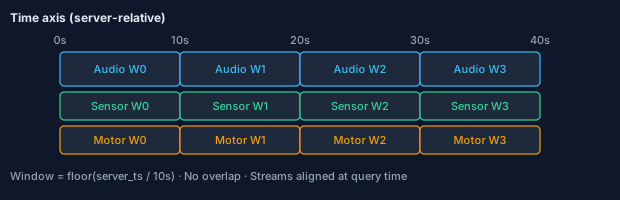
| Window alignment diagram | diagrams/feasibility-window-align.svg |
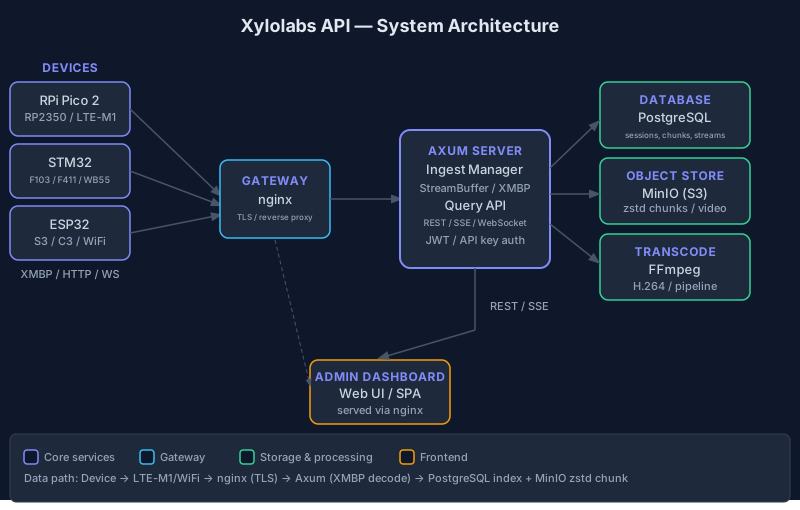
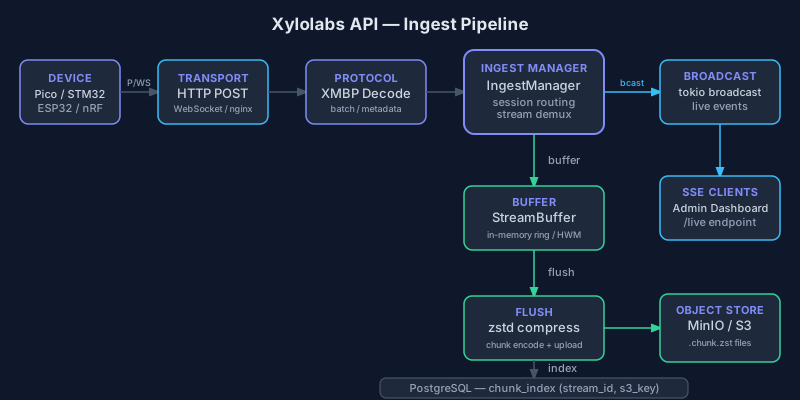
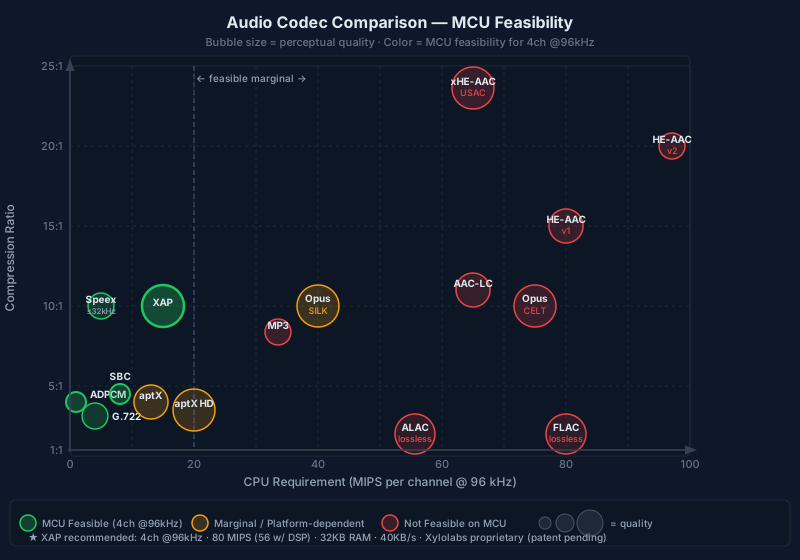
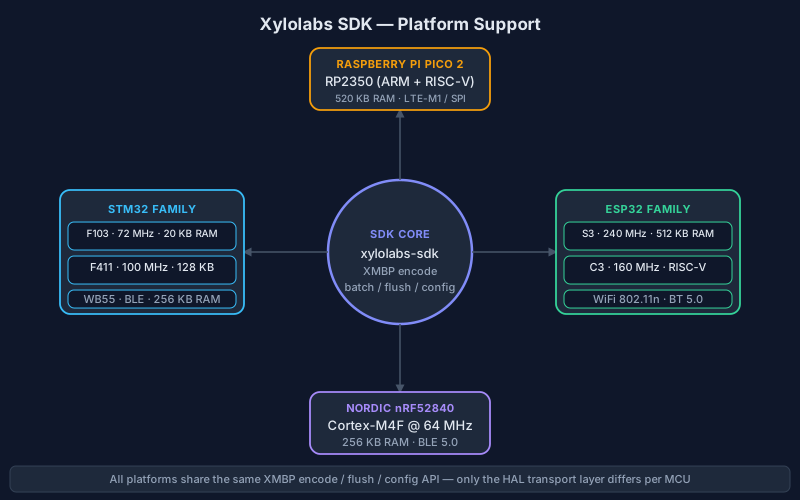
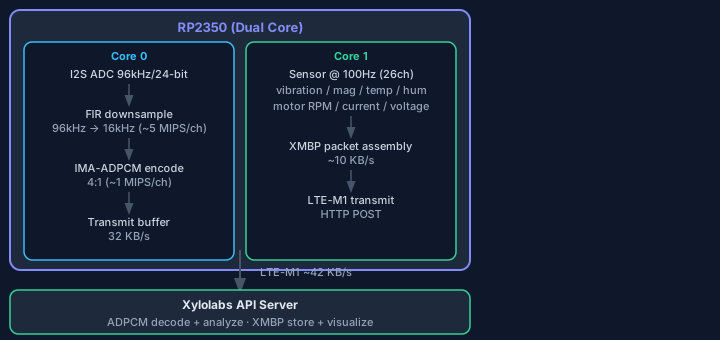
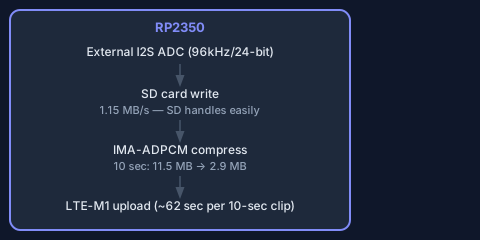
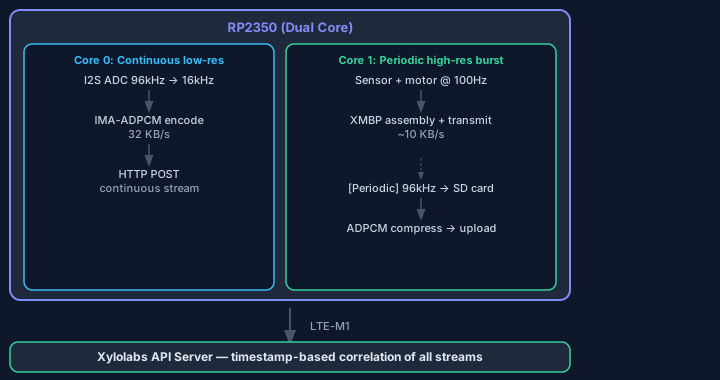
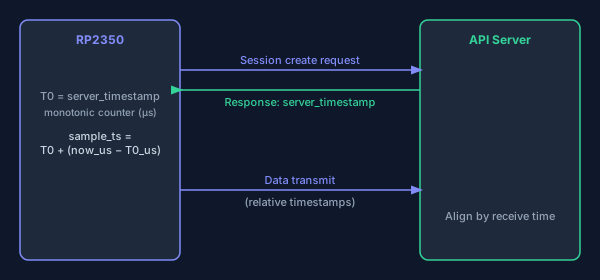
Platform Guides
Per-MCU integration guides covering hardware setup, pin assignments, codec capability, and SDK wiring.
RP2350 / Pico 2 W (Primary Target)
The primary reference target. Dual Cortex-M33 @ 150 MHz, 520 KB SRAM, PIO-based I2S, CYW43 WiFi/BT, ARMv8-M DSP extensions. Requires external I2S ADC for 96 kHz/24-bit audio.
- RP2350 / Pico 2 W Platform Guide — Specifications, I2S ADC wiring, LTE-M1 modem wiring, pin assignments, SDK integration, codec capability (4ch XAP @ 96 kHz)
- RP2350 / Pico 2 W Platform Guide (한국어)
ESP32-S3
Native WiFi — no external LTE modem required. ESP32-S3 supports 4ch XAP @ 96 kHz via 128-bit Xtensa SIMD.
- ESP32 Platform Guide — Supported targets table, I2S MEMS microphone wiring, WiFi native stack notes, codec capability matrix
- ESP32 Platform Guide (한국어)
STM32 (WB55, WBA55)
Cortex-M4F/M33 targets. WB55 and WBA55 support XAP (FPU + DSP). WB55 adds BLE with 4ch ADC at 48 kHz; WBA55 at 96 kHz.
- STM32 Platform Guide — Supported targets table (WB55 / WBA55), I2S ADC wiring, internal ADC for BLE targets, HAL-based CubeMX-compatible examples, codec capability per variant
- STM32 Platform Guide (한국어)
nRF9160
Nordic Cortex-M33 target. nRF9160 transports via LTE-M / NB-IoT.
- nRF Platform Guide — Supported targets table, SPI sensor wiring (LIS2DH12), Zephyr RTOS integration, LTE modem transport architecture
- nRF Platform Guide (한국어)
Hardware
Reference hardware documentation for the Xylolabs RP2350 full sensor node.
- Hardware BOM — Complete bill of materials: MCU (RP2350), audio ADC (PCM1860QDBTRQ1), microphones (WM-61A), environment sensor (SEN0385/CHT832X), accelerometer (ADXL345), LTE modem (BG770A), passives, connectors, purchase links
- Hardware BOM (한국어)
Deployment & Operations
Production is a single EC2 host (api.xylolabs.com) serving four subdomains behind nginx + Let's Encrypt. Deploys are triggered by scripts/deploy.sh, which builds the Docker image on the remote host, starts Docker Compose (app, postgres, minio), and reloads nginx.
| Subdomain | Purpose | Backing |
|---|---|---|
api.xylolabs.com |
REST + WebSocket ingestion | Axum app container, port 3000 |
admin.api.xylolabs.com |
Legacy admin dashboard (React SPA) | Axum app serves SPA + API |
app.xylolabs.com |
Operator dashboard (frontend-app) | Axum app serves static-app + API |
docs.api.xylolabs.com |
Static documentation bundle | Nginx-served static site generated from docs/ |
SQLx migrations (140 files in crates/xylolabs-db/migrations/; verify: ls crates/xylolabs-db/migrations/*.sql | wc -l) run on every app startup. Never reuse a migration version prefix, and never author a migration that depends on a column added by a later-prefixed migration — a misordered pair on 2026-04-18 (20260418000002 vs 20260418000003) caused a full prod crash-loop on 2026-04-24 that was resolved by renumbering. Deploy now preflights production _sqlx_migrations against source versions and SHA-384 checksums before building the replacement image. See the facility_id incident and full migration rules in Deployment Guide › Database Migrations.
- Deployment Guide — environment variables, RBAC, migrations, nginx/certbot flow, deploy script walkthrough.
API-Key Plaintext Guard (2026-06-11)
API keys are stored in plaintext permanently (locked policy — operators must be able to re-copy a key at any time). A database trigger, api_keys_plaintext_guard (20260611210000_relax_api_key_plaintext_guard.sql), enforces two transition rules:
- No hash-only registration:
INSERTwithkey_plaintext = ''is rejected (the column isNOT NULL DEFAULT '', so omitting it is rejected too). - Plaintext can never be stripped:
UPDATEfrom a non-empty plaintext to''is rejected.
31 legacy rows (written by the pre-2026-06-11 scripts/register-device-key.sh, which inserted only the hash) carry key_plaintext = ''; their plaintext is unrecoverable. These rows remain fully operational — delete/rename/rotate/device-bind and the per-request last_used_at write all pass, because a '' -> '' row update does not violate the transition rules. A legacy row heals (gains a stored plaintext) when the key is rotated or re-registered via scripts/register-device-key.sh, which now inserts the plaintext it is given and upserts it on conflict.
History: the guard was first shipped as CHECK (key_plaintext <> '') NOT VALID (20260611000001). PostgreSQL re-evaluates even NOT VALID CHECK constraints on every row update, which froze all lifecycle writes on the legacy rows in production (per-request last_used_at WARN spam; 500 on operator delete). The trigger migration replaced it the same day. Do not re-introduce a state-scoped CHECK on this column.
scripts/register-device-key.sh hard-fails on a non-UUID facility id and doubles single quotes before interpolating its arguments into SQL (psql -c has no parameter binding); the xk_<64-hex> format check stays warn-only on purpose.
Outbound HTTP Redirect Policy (2026-06-12)
All three server-side reqwest clients (shared dispatch client, GPU health checker, inference worker) are built with redirect(Policy::none()) — outbound webhook/push/GPU/inference calls never follow 3xx responses (SEC18-01, cycle 18). reqwest's default follows up to 10 redirects, which let a webhook recipient (or compromised GPU node) reply 307 Location: http://169.254.169.254/... and bounce the dispatcher past every create-time SSRF allowlist/denylist into cloud metadata or internal services. A 3xx from these recipients is treated as an error. Note: this does NOT close the sibling DNS-rebinding TOCTOU (a hostname that re-resolves to an internal IP between validation and dispatch) — that needs a custom resolver that re-checks the resolved socket address and remains a tracked deferral (P773 D18-26).
Multi-Sensor Fusion Detector (Phase 2, 2026-06-14)
A background worker (services/fusion_detector.rs, mirroring noise_level.rs, off the hot ingest path) that correlates a device's scalar streams (temperature, noise_db, humidity, battery, …) into one anomaly score. It keeps a rolling per-device baseline in device_feature_baselines (a serialized xylolabs_core::fusion::FeatureBaseline — online per-feature Welford mean + M2 + counts) and, for each newly-CLOSED session, scores the session's {stream: mean} feature vector by its diagonal-covariance Mahalanobis distance (sqrt of summed per-feature squared z-scores). Distance ≥ 4 → Warning, ≥ 6 → Critical anomaly_reports row (anomaly_type='sensor_fusion', source=batch), which flows through alert_trigger like any other anomaly. The watermark (last_session_us) advances only across a contiguous prefix of closed sessions so a late-closing session is never skipped, and each session's vector is folded exactly once (folding is not idempotent). OFF by default (FUSION_DETECTOR_ENABLED=false) — a new S3-reading worker is opt-in. The scorer is pure + unit-tested (fusion.rs tests). Array streams (accel/gyro/mag) and the GPU model slot (active SensorFusion inference model) are tracked follow-ups.
Acoustic Predictive Maintenance (Phase 3, 2026-06-14)
A background worker (services/acoustic_detector.rs, gated off via ACOUSTIC_DETECTOR_ENABLED) that decodes each newly-closed session's audio to bounded mono PCM (xylolabs_transcode::xap_decode::decode_xap_to_mono_pcm, additive, mirrors the proven RMS decode loop) and runs a model-free DSP feature + classifier core (xylolabs_core::acoustic): time-domain impulsiveness (excess kurtosis, crest factor, ZCR) and spectral shape (centroid, flatness, high-band ratio via a Hann window + an in-place radix-2 FFT). A heuristic classifier maps those to a coarse signature — bearing wear (impulsive + high-band), cavitation (broadband/flat), tonal imbalance (very low flatness) — emitting an acoustic_signature anomaly_reports row that flows through alert_trigger. Its own watermark (device_feature_baselines.last_acoustic_us, independent of the fusion watermark) advances across a contiguous prefix of closed sessions. The DSP core is pure + 8 unit tests (FFT recovers a tone bin, tone→imbalance, impulse→bearing-wear); the decode has its own None-path test. Follow-up: GPU Audio model slot + an acoustic_health derived timeseries stream.
Firmware & OTA
- Firmware releases are uploaded to S3 and tracked in the
firmware_releasestable - Deployments target specific devices via the
firmware_deploymentstable with status tracking (pending → downloading → verified → applied) - Devices poll
/api/v1/ota/checkwith their hardware_target to discover updates - Progress is reported back via
/api/v1/ota/deployments/{id}/progress - Admin manages releases and deployments via the Firmware page in the dashboard
- One active deployment per device (partial unique index
idx_deployments_active_per_device, migration20260710150000): creating a deployment while a device still holds a pending/downloading/downloaded/verified row returns409 Conflictnaming the blocking deployment (was an opaque 500 until the 2026-07-11 fix; fleet unit 0011's stuck June-16 pending row was the discovering case). Cancel the blocker, then re-create. - Blocked-offer visibility (2026-07-12, C8-AGG-2 follow-up): the OTA check's silent-skip branches (release invisible in the device's current facility after a transfer; incompatible
hardware_target) stamp the deployment row'serror_messagewithblocked: …and write onefirmware.deployment_blockedaudit entry — the June-16 campaign's four releases black-holed exactly this way with no signal.
Incident evidence — uid100001 health-lane silence (2026-07-01 → )
The legacy harbor row Xylo-KOSPO #0001 (device_uid=100001, NULL
dongle_id, Kospo-An facility) shows how last_seen_at freshness can lie
about firmware: its firmware_version read 0.1.0 with minutes-fresh
last_seen_at for 11+ days. Read-only evidence gathered 2026-07-12:
- Health posts (
POST /v1/devices/health?device_uid=100001, the only writer of its fw field): every ~10.4 min, all HTTP 200, zero 4xx/5xx in the entire request-log retention window, then clean cessation after 2026-07-01T04:59:00Z. Final body:{"health_flags":0,"battery_v":3.440,"uptime_sec":1743808,"fw_version":"0.1.0"}(uptime ≈ 20.2 days → boot ≈ 2026-06-11T04:35Z). - XMBP session-opens (
POST /v1/ingest/sessions, nameKOSPO1, temperature/humidity/accel@800Hz/battery/audio_lc3@48kHz/alert streams) continued uninterrupted on the same ~10.4-min cadence through 2026-07-12 — authenticated by theKospo-Anwildcard key (f473b259-…, prefixxk_bec48, scopes{*}, unbound). - Verdict: server-side rejection ruled out (no failed posts, no key
deactivation — the wildcard key stayed active and in use). The poster's
health task died on-device while its session task lived on; which physical
board it is gets confirmed at the harbor equipment replacement (bench
analysis of the returned units). The
firmware_version_reported_atcolumn (migration20260713120000) exists so this "fresh but ancient fw" illusion can't recur unnoticed; the wildcard key's retirement plan is RUNBOOK-WILDCARD-KEY-RETIREMENT.md.
Device remote config / firmware schema
Referenced from
crates/xylolabs-server/src/routes/device_config.rsandcrates/xylolabs-server/src/config_registry.rs.
Desired / reported model (device shadow)
Each device has at most one row in device_configs. The row holds two sides:
| Field | Description |
|---|---|
desired_values |
Operator-set {key: value} JSON object validated against config_registry::REGISTRY. |
config_version |
Monotonically increasing integer bumped on every desired_values write. Carried to the device as a hint in health-check responses. |
reported_version |
The config_version the device last acknowledged it applied. |
reported_status |
Free-text status string reported by the device alongside reported_version. |
reported_at |
Timestamp of the last device-side report. |
A config_version of 0 means no desired config has been set yet (no row exists). The first PUT inserts the row at version 1.
Editable key registry (Phase 1 — duty keys)
config_registry::REGISTRY is the single source of truth for which NVS-backed keys an operator may set remotely. Phase 1 ships four keys:
| Key | Type | Range | Purpose |
|---|---|---|---|
cycle_period_s |
u32 | 20 – 86400 | Duty cycle period in seconds |
active_max_s |
u32 | 1 – 86400 | Maximum active window within a cycle |
duty_deep_sleep |
bool | — | Enable deep-sleep between cycles |
ota_check_cycles |
u32 | 1 – 65535 | Check for OTA updates every N cycles |
Identity keys (api_key, device id) are intentionally absent — they are never editable remotely (self-lockout guard).
Cross-field validation rule
active_max_s must be ≤ cycle_period_s. This rule is enforced in two places:
validate_patch— checks the incoming patch object alone.validate_merged— checks the patch merged with the existing stored desired values, run under a row lock (set_desired_checked) so two concurrent partial PUTs cannot each validate a stale snapshot and then combine into an out-of-policy stored row.
Both checks must pass; patch validation alone is necessary but not sufficient.
Heartbeat / reported-version flow
- Device sends a periodic health report (XMBP or HTTP).
- Server health-response includes the current
config_versionhint. - If the hint differs from the device's locally applied version, the firmware calls
GET /api/v1/devices/{id}/config(API-key auth, device-scoped) to pull its desired config. - The firmware applies the new config and posts its
reported_version+reported_statusback to the server. - The admin view (
GET /api/v1/admin/devices/{id}/config) shows bothdesired_values/config_versionandreported_version/reported_statusso operators can confirm convergence.
Phase 2 will add audio keys; Phase 3 will add network/wifi keys with a confirm-or-rollback handshake.
Server Features
XAP Server-Side Decoder
The xylolabs-transcode crate includes a full XAP decoder (xap_decode.rs) that reconstructs PCM from XAP-encoded audio. The transcode pipeline automatically detects .xap uploads and decodes them to WAV before FFmpeg transcoding.
- Inverse MDCT transform:
x[n] = (2/N) * Σ X[k] * cos(π/N * (n+0.5+N/4) * (k+0.5)) - Adaptive dequantization:
coeff = quantized_i8 * step_size - Supports all XAP sample rates (8–96 kHz), 1–4 channels
- Sample rate inferred from frame header
frame_samplesfield
Transcode Queue & Stale Job Reaper
Transcoding uses a Postgres-backed job queue with FOR UPDATE SKIP LOCKED for atomic claiming. The worker includes:
- Bounded concurrency via
Semaphore(configurable, 1–32) - Event-driven via
pg_notify('transcode_queue')with 10s polling fallback - Stale job reaper: on startup and every 60s, requeues jobs stuck in
'running'pastTRANSCODE_STALE_TIMEOUT_SECS(default 7200 = 2 hours) - Retry with backoff: failed jobs auto-requeue if under
max_attempts
Live Audio Streaming
Coexists with the session-based batch ingest pipeline. Devices push continuous audio to wss://api.xylolabs.com/api/v1/live/streams/{stream_key}/ingest (API key + live:ingest scope); listeners subscribe at /api/v1/live/streams/{id}/listen.ws?format=lc3 (JWT or API key + live:listen scope). Browsers obtain a short-lived listener JWT via POST /api/v1/auth/live-token (5-minute expiry).
The pipeline lives in crates/xylolabs-server/src/live/manager.rs (LiveAudioManager):
- Fan-out bus: per-stream
tokio::sync::broadcast::Sender<Bytes>with 1024-slot capacity. Listeners that fall behind get dropped frames counted but no backpressure on the producer. - Stream-meta cache:
mini_moka::sync::Cachewith 5-minute TTL eliminates the per-flush DB roundtrip for the (facility_id, retention_days, codec) tuple. - Archive flush: every 60 s, raw LC3 frames are zstd-compressed inside
tokio::task::spawn_blocking(off the runtime), uploaded tos3://.../live/{facility}/{stream}/lc3/{start}_{end}.bin.zst, and indexed inlive_archive_segments. TwoAtomicU64counters (LIVE_ARCHIVE_FLUSH_SUCCESSES,LIVE_ARCHIVE_FLUSH_FAILURES) plus anAtomicI64LIVE_ARCHIVE_FLUSH_LAST_USdistinguish "silent" from "wedged". - Retention worker: every 30 min, prunes
live_archive_segmentsrows older thanretention_days(default 30) and deletes S3 objects with 8-waybuffer_unorderedparallelism. CounterLIVE_RETENTION_ROWS_PRUNEDtracks total pruned rows. - Cleanup task: every 30 min, removes broadcast senders that have no subscribers and no recent producer activity.
- Orphan reaper: on server startup,
crates/xylolabs-server/src/main.rscloses all openlive_stream_connectionsrows from a prior process (mirrors theingest_sessionscleanup pattern). Prevents leaked connection records from skewingtotal_subscribersafter a crash.
Validation at the REST/WS gate: channels 1–8, sample_rate_hz ∈ {8/16/24/32/48/96 kHz}, bitrate_per_channel_bps 16k–320k, display_name ≤ 200 B, channel_names length-must-match-channels and each ≤ 32 B, no control characters anywhere, transcode_profile ∈ {default, low, high}, retention_days 1–3650.
Audit-logged on every POST/PATCH/DELETE to live_streams (actor user or API key id, before/after state, IP/UA when available).
SuperAdmin observability via GET /api/v1/live/metrics (also rendered as a panel in the admin dashboard):
{
  "archive_flush_successes":    <u64>,
  "archive_flush_failures":     <u64>,
  "active_broadcast_streams":   <u64>,
  "total_subscribers":          <u64>,
  "last_archive_flush_at_us":   <i64>,  // 0 = no flush since boot
  "retention_rows_pruned_total":<u64>
}
Nginx redacts the listener JWT query param from access logs via a dedicated log_format live_scrubbed applied to /api/v1/live/streams/.../listen.ws (path-only; no $query_string). The ingest path uses the same format defensively even though it is API-key authenticated.
Database tables (migrations 20260522130000*): live_streams, live_stream_connections, live_archive_segments.
Full wire contract: API Documentation (English), Section 25 | 한국어, §25.
API Request Logging
A Tower middleware layer (api_request_log) captures HTTP request/response metadata for every API call and writes to the api_request_logs table asynchronously. Key features:
- Privacy-safe by default: sensitive body fields (
password,token,secret,api_key,refresh_token,access_token,authorization,cookie) are redacted recursively. Query string parameters matching sensitive keys are redacted.Authorization,Cookie,X-Api-Key, andProxy-Authorizationheaders are stripped. - Body format tracking: classifies request/response bodies as
json,text,base64, oromitted(multipart and oversized payloads). Stores content type, size, and a truncated preview. - Facility scoping: every log entry carries a
facility_idfor multi-tenant filtering. TheGET /api/api-logsendpoint is SuperAdmin-only and supports filtering by method, path, status, user, facility, date range, and sort. - Health-check exclusion:
/api/healthand/api/health/readyare excluded from logging to avoid DB spam. - Backpressure: DB writes are bounded by a
tokio::sync::Semaphore(100 concurrent) to prevent unbounded task accumulation under load. - Composite index:
facility_id + created_atfor fast filtered queries.
Ingest Session Modes
Sessions operate in one of two modes, configured at creation time:
| Mode | Timeout | Use Case |
|---|---|---|
continuous (default) |
session_timeout_secs (5 min) |
Nonstop streaming (vibration monitors, audio) |
sampling |
max(sampling_timeout_secs, interval×3) (1h+) |
Periodic measurement with idle gaps (battery sensors) |
Sampling-mode sessions carry additional fields:
- sampling_interval_secs: expected seconds between measurement starts (e.g., 300 = 5 min)
- sampling_duration_secs: expected seconds per measurement burst (e.g., 10)
The IngestManager uses per-session timeout instead of a global value. This prevents session explosion for devices that sleep between measurement cycles. The frontend detects gaps in time-series data and breaks chart lines at measurement boundaries.
- Sampling Mode Plan — Implementation plan and design rationale
Metadata Stream Visualization
The admin dashboard (admin.api.xylolabs.com) includes a metadata visualization frontend:
- Uploads list (
/metadata): paginated table with device filter, status filter, mode filter, stream counts, sample totals, data sizes - Session detail (
/metadata/:id): per-stream time-series charts (RechartsLineChart), time range selector, sampling info panel, gap-aware rendering for sampling-mode sessions, non-numeric table fallback - Audio waveform (
/uploads/:id): wavesurfer.js interactive waveform player with play/pause and time scrubbing - Device fleet (
/): dashboard with device health status bar, active sessions panel, recent uploads panel - API request logs (
/api-logs): sortable paginated table of captured HTTP logs with method/path/status/date filters, expandable detail rows showing request/response headers and body previews (JSON, base64 hex dump, or "omitted"), debounced text inputs, and facility-scoped access
Operator Dashboard (frontend-app)
The operator dashboard (app.xylolabs.com) is the primary day-to-day interface for facility operators. Built with React 19 + Vite + TailwindCSS 4, it replaces the legacy admin dashboard for routine monitoring tasks:
- Home (
/): facility overview with KPI cards (device count, active sessions, recent alerts), real-time SSE connection status, time-ago formatted timestamps, and skeleton loading states - Devices (
/devices): paginated device fleet table with health indicators, detail drill-down, and facility-scoped access - Sessions (
/sessions): ingest session history with metadata summary and detail view. Super Admin sees sessions across every facility by default (no facility filter); other roles are auto-scoped to their own facility by the backend. Pagination is stable:id DESCtiebreaker on the SQL ORDER BY plus aREPEATABLE READsnapshot fortotal+ rows so pages don't shuffle under concurrent writes. - Alerts (
/alerts): real-time anomaly feed with rule-based action guide cards, severity indicators, and historical alert browser. Super Admin sees alerts across every facility by default; other roles are auto-scoped to their own facility. - Trends (
/trends): time-series analytics for facility-level metrics - Facility Map (
/facility-map): spatial device and sensor visualization - Settings (
/settings): per-user locale (EN/KO), display preferences, and theme (light/dark/auto)
Features: command palette (Ctrl+K), toast notifications, keyboard shortcuts, responsive mobile layout with bottom-tab navigation, auto night mode, and skeleton loading throughout.
Grafana-style Dashboard Primitives
Both frontends ship a shared dashboard primitive set modeled after Grafana's panel + global time range + auto-refresh pattern. Source lives in frontend/src/components/dashboard/ and a mirrored copy in frontend-app/src/components/dashboard/ (no monorepo package — adapted per-side for differing auth / routing surfaces).
| Component | Responsibility |
|---|---|
DashboardProvider |
Exposes { timeRange, refreshIntervalMs } to nested panels; syncs to URL (?from=&to=&refresh=). |
DashboardGrid |
12-col responsive CSS grid. Tablet: 2-col. Mobile (≤ 768 px): single column. |
Panel |
Canonical card primitive — header (title + optional info-tooltip + action menu), body, shared loading / empty / error slots. Named exports PanelSkeleton, PanelEmpty, PanelError. |
StatPanel |
Single big-number panel with optional Recharts sparkline, threshold-color band, font-variant-numeric: tabular-nums, aria-label on the numeric value. Renders explicit empty state when value is null. |
TimeRangePicker |
Relative ranges (Last 5 m / 1 h / 24 h / 7 d / 30 d) + custom datetime-local; aria-haspopup="listbox"; iOS font-size: 16px floor. |
RefreshPicker |
Off / 10 s / 30 s / 1 m / 5 m / 15 m. Off maps to refetchInterval: false. |
PanelSkeleton |
Pulse-animated rows; motion-safe:animate-pulse honors prefers-reduced-motion. |
The admin Operations Dashboard (frontend/src/pages/DashboardPage.tsx) is composed of ≥ 10 panels including LiveMetricsCard (live audio pipeline), system health (/api/health), transcode jobs (4-up status strip), recent uploads, active sessions, device fleet, and facility map. Every panel reads time range + refresh from useDashboardContext(). SuperAdmin-only panels (e.g. live audio metrics) fail silently on 403 so the layout stays clean for non-admins.
The facility-user app dashboard (frontend-app/src/pages/DashboardPage.tsx at /dashboard, keyboard shortcut g b) renders 7 facility-scoped panels including My Active Live Streams, Recent Recordings, Recent Alerts, and the SVG DeviceLastSeenHeatmap (device × hour grid, color-banded by recency). All queries are scoped to the user's session facility_id; no cross-facility leakage by construction.
Accessibility / responsive contract: heading semantics on every Panel header, aria-haspopup/aria-expanded on every picker, visible focus rings on action links, motion-safe: on every pulse animation, single-column collapse ≤ 768 px, dark/light mode parity verified.
Internal API
The Internal API (/api/internal/*) provides machine-to-machine endpoints for the
GPU inference fleet and anomaly reporting. Authentication is by API key with the
internal scope, and every key is scoped to a single facility_id; responses
never cross facilities.
- GPU Server Management (
crates/xylolabs-server/src/routes/gpu_servers.rs) -- Per-facility CRUD plus utilization reporting and snapshot endpoints. Each row carries an operationalstatus(online/offline/draining/error) that gates job scheduling and a separate observabilityhealth_status(healthy/degraded/unknown) driven by the health checker. SSRF-prone inputs are rejected at create time (link-local, cloud metadata 169.254.169.254, loopback outsideXYLOLABS_ENV=development/test). Direct status overrides viaPATCHbypass the health-checker state machine and are recorded in the audit log. - Inference Models (
crates/xylolabs-server/src/routes/inference.rs) -- Per-facility CRUD. Each model points to an S3 artifact and declares aframework(onnx/tensorrt/pytorch/custom) and aninput_type(audio/sensor_fusion/image/text).is_active=falseremoves the model from job/proxy lookups without deleting it. - Inference Jobs (
crates/xylolabs-server/src/routes/inference.rs) -- Submit, list, get, and cancel async jobs. The backgroundinference_worker(default 4 tokio tasks) atomically claims rows withSELECT ... FOR UPDATE SKIP LOCKEDand processes them on the assigned GPU. Submission validates that any pinnedgpu_server_idbelongs to the caller's facility and isonline; payloads are bounded to 64 KB. - Inference Proxy (
crates/xylolabs-server/src/routes/inference_proxy.rs) -- Synchronous low-latency path. The handler resolves(model_name, model_version)to an active model row, picks a GPU viagpu_server::find_first_available, and forwardsPOST /v1/inferencewith a 30 s timeout. Upstream responses are read with a streaming 1 MB bound; oversize bodies are rejected with400. Persistent upstream errors mark the GPU server withlast_errorso the health checker can rotate it out; transient HTTP429/503are surfaced as409 Conflictwithout taking the server offline. - Anomaly Detection (
crates/xylolabs-server/src/routes/anomaly.rs) -- Reports come from three sources:realtime(inline detection inIngestManager::process_batch),batch(the placeholderPOST /anomaly/batchendpoint, which currently records aninfo-severity marker report and broadcasts an event for downstream batch jobs to consume), andmanual. Severities areinfo/warning/critical. TheGET /anomaly/liveSSE endpoint forwards events filtered by the subscriber's facility; anevent: lagnotice is emitted when the broadcast channel overflows.
Background services in crates/xylolabs-server/src/services/:
inference_worker.rs--INFERENCE_WORKER_CONCURRENCYtokio tasks (default 4). Exponential 2 → 30 s backoff when the queue is empty. Cancellation is honoured between claim andmark_running. Response bodies are streamed through a 1 MB bounded reader, error bodies through a 10 KB bound, all failure messages truncated to 256 chars before persistence.gpu_health_checker.rs-- runs everyGPU_HEALTH_CHECK_INTERVAL_SECS(default 60, minimum 10). Probes everyonlineserver withbuffer_unordered(10)parallelism. HTTP429/503are tolerated; other failures callmark_server_error.alert_common.rs,alert_text.rs,alert_llm.rs,alert_trigger.rs-- bridge anomalies and configured alert rules to the user-facing alert pipeline (email, SMS viasms.rs, web push viapush.rs, webhooks viawebhook_dispatch.rs).
Concurrency / capacity knobs: INFERENCE_WORKER_CONCURRENCY,
INFERENCE_JOB_STALE_TIMEOUT_SECS, GPU_HEALTH_CHECK_INTERVAL_SECS,
ANOMALY_BROADCAST_CAPACITY.
Database tables: gpu_servers, inference_models, inference_jobs,
anomaly_reports.
Full endpoint reference: API Documentation (English) -- Section 24 | API Documentation (한국어) -- Section 24
Inference Pipeline
External ML clients fetch session data, run local models, and post results back via the inference pipeline. Anomaly reports are broadcast via SSE to the operator dashboard in real time.
Full endpoint reference: API Documentation (English) -- Section 26 | API Documentation (한국어) -- Section 26
Inference Pipeline Architecture
Device (audio + sensors)
        │
        ▼
  Ingest endpoint  ──▶  PostgreSQL + S3
        │
        ▼
  Inference client polls for closed sessions
  (GET /api/v1/metadata/sessions, /inference-bundle)
        │
        ▼
  Client runs local ML model
  (anomaly detection, event classification, audio analysis)
        │
        ▼
  POST /api/internal/inference/results  (or /results/batch)
        │
        ▼
  API creates anomaly_reports row + broadcasts AnomalyEvent via SSE
        │
        ▼
  Operator app (app.xylolabs.com) renders real-time alert
The pipeline is facility-scoped end-to-end. An inference client authenticated with an internal-scope API key can only read sessions and write reports within its own facility.
GPU Server Management
GPU servers are the inference compute nodes registered per-facility. Each server row carries two orthogonal state flags:
status(online/offline/draining/error) — gates whether the server receives jobs and proxy calls. Onlyonlineservers are selected by the job scheduler and proxy handler.health_status(healthy/degraded/unknown) — driven exclusively by thegpu_health_checkerbackground task; operators read this as an observability signal, not a scheduling gate.
Direct overrides via PATCH /api/internal/gpu-servers/{id} (setting status manually) bypass the health-checker state machine and are recorded in the audit log. Use them for maintenance windows and emergency rotation.
Health checker (crates/xylolabs-server/src/services/gpu_health_checker.rs): probes every online server at GPU_HEALTH_CHECK_INTERVAL_SECS (default 60, minimum 10) via GET http://<ip>:<port>/health. Persistent failures (non-429/503) call mark_server_error. Transient 429/503 are tolerated without degrading status.
SSRF protection: link-local addresses, 169.254.169.254 (cloud metadata), and loopback are rejected at registration time (except in development/test environments).
Anomaly Detection Workflow
Anomaly reports are created from three sources:
| Source | How created | Typical use |
|---|---|---|
realtime |
Inline in IngestManager::process_batch when a sensor value crosses a configured threshold |
Immediate alerts during live ingest |
batch |
POST /api/internal/anomaly/batch creates a placeholder info report and broadcasts a trigger event |
Kick off downstream batch analysis jobs |
manual |
POST /api/internal/inference/results with results from an external ML model |
ML-driven anomaly detection after session close |
Severity levels: info (informational, no immediate action), warning (investigate soon), critical (requires immediate attention).
Threshold-based detection runs synchronously inside the ingest path and must be O(1). It checks each incoming sensor sample against per-stream thresholds configured in the facility settings.
Authoritative anomaly thresholds (Inference Ops). The detection limits — temperature_max_c (60 °C), nox_raw_index_max (25000), noise_dbfs_max (−18 dBFS), numeric_warn (1000), numeric_critical (10000) — live in a single in-code registry (crates/xylolabs-server/src/threshold_registry.rs) with per-scope override rows (anomaly_threshold_overrides), resolved device → facility → hardware-version → global → default (services/threshold_resolver.rs, 30 s cache invalidated on admin edits). Registry defaults equal the historical hardcoded values, so the resolver is a behavioral no-op until an operator sets an override. The ingest detector, the inference-result overheating guard, and the GPU fleet's rubric all derive from it. The fleet pulls the rubric from GET /api/internal/inference/rubric (ETag/304); admins edit via GET/PUT/DELETE /api/v1/inference-ops/thresholds (FacilityAdmin; global/hw_version require SuperAdmin) and the Inference Ops → Anomaly Thresholds admin page. This replaced the old model where the "critical > 45/46 °C" limit was buried in the served inference-model prompt and unfindable across repos. Spec: docs/superpowers/specs/2026-07-12-inference-ops-authoritative-thresholds-design.md; REST: docs/API.{en,ko}.md §29.
ML-driven detection runs asynchronously after session close. The inference client fetches the session bundle, runs the model, and calls POST /internal/inference/results. Reports appear on GET /internal/anomaly/live within milliseconds of submission.
Resolution: any report can be marked resolved via POST /api/internal/anomaly/reports/{id}/resolve. Resolved reports are retained for audit purposes; is_resolved: true and resolved_at are set.
Reclassification: PATCH /api/internal/anomaly/reports/{id} lets an operator or automated reviewer update anomaly_type, severity, confidence, or description without creating a new report.
Event and Label Management
anomaly_type is a free-form string (≤128 chars) defined by the application. Use it as a hierarchical classifier, for example:
bearing_fault/bearing_wear/bearing_spallovertemperature/thermal_runawayimpact_event/resonance/imbalance
Consistency across the facility enables filtering, trend analysis, and alert rule matching. The PATCH /api/internal/anomaly/reports/{id} endpoint is the reclassification path when a label needs correction after human review.
The confidence field (float, 0–1) is set by the ML model and carried through to the alert pipeline. Alert rules can filter on confidence_min to suppress low-confidence noise.
Operator Notification Flow
When an anomaly report is created (from any source), the platform:
- Writes the
anomaly_reportsrow to PostgreSQL. - Broadcasts an
AnomalyEventon thetokio::sync::broadcastchannel (capacityANOMALY_BROADCAST_CAPACITY, default 10000). GET /api/internal/anomaly/liveSSE subscribers receive the event, filtered byfacility_id.- The alert bridge (
services/alert_trigger.rs) evaluates whether any configured alert rule matches the report. If a rule matches, it creates a user-facing alert and dispatches notifications (email, SMS, web push, webhook) per the facility's alert configuration. - The operator app at
app.xylolabs.comreceives the SSE event and displays the alert card in real time on the/alertspage.
SSE backpressure: if the broadcast channel fills faster than a subscriber can drain it, the subscriber receives event: lag with a skipped count and jumps to the current tail. The ingest path is never back-pressured.
Keep-alive: a ping comment is sent every 30 seconds so HTTP intermediaries (proxies, load balancers) do not close the idle connection.
Inference Worker (Async Job Path)
crates/xylolabs-server/src/services/inference_worker.rs. Runs INFERENCE_WORKER_CONCURRENCY (default 4) independent tokio tasks. Each task:
- Polls
inference_jobsfor facilities withqueuedrows usingSELECT ... FOR UPDATE SKIP LOCKED(prevents double-claim). - Resolves the target GPU: pinned
gpu_server_idif set, otherwisegpu_server::find_first_available. - Transitions to
runningonly ifmark_runningreturnsSome— if the job was cancelled between claim and transition, the worker drops it without contacting the GPU. POST /v1/inferenceto the GPU URL with a 1 MB streaming response bound. Stores the parsed JSON ininference_jobs.result.- Error handling: HTTP
429/503mark the jobfailedbut do not take the GPU offline. Any other failure marks both the job and the GPU server withlast_error.
Empty-queue backoff is exponential (2 → 30 s), resetting to 2 s on any successful claim.
Stale jobs (stuck in running past INFERENCE_JOB_STALE_TIMEOUT_SECS, default 600) are requeued on worker startup and every 60 seconds thereafter.
Inference Proxy (Sync Path)
POST /api/internal/proxy/inference is the synchronous low-latency alternative to the job queue. It resolves (model_name, model_version) → active model → first available GPU and forwards POST /v1/inference with a 30 s timeout. Use this path for interactive or real-time inference where sub-second latency matters; use the job queue for long-running batch workloads.
API Reference
REST API documentation for the Xylolabs server.
- API Documentation (English) — Full REST API reference: authentication, facilities, users, API keys, devices, audio upload, audio streaming, transcode jobs, tags, metadata ingest, metadata query, system configuration, dashboard stats, health, XMBP protocol reference, RBAC, error responses, data models, pagination, example workflows
- API Documentation (한국어)
Route prefix note: auth routes (login, me, refresh, logout, sessions, change-password) are mounted at /api/auth/*, NOT under /api/v1/. The versioned /api/v1/ prefix is reserved for ingest, device, live, metadata, and the other resource endpoints (router.rs: auth_routes/auth_me nest at /auth directly under /api, while api_key_routes/ingest_routes/ws_route/live_ws_route/ota_device_routes/protected_routes nest under /api/v1).
SDK — Rust Crates
The Rust SDK is the recommended path for all new firmware development. All crates are no_std-compatible.
Core SDK
crates/xylolabs-sdk/— Main SDK crate.XylolabsClient<P, AUDIO_RING, XMBP_BUF>state machine,SessionManager,HttpTransport,RingBuffer, XAP codec, ADPCM codec,Platformtrait abstraction. No heap allocation.- xylolabs-sdk (한국어)
crates/xylolabs-protocol/—no_stdXMBP wire format implementation shared between device firmware and server. Single source of truth for XMBP encoding and decoding.- xylolabs-protocol (한국어)
HAL Crates (Platform Implementations)
| Crate | Target | Transport | Codec | Embassy chip pin |
|---|---|---|---|---|
xylolabs-hal-rp |
RP2350 (Pico 2) | LTE-M1 modem via UART | XAP | embassy-rp 0.10 |
xylolabs-hal-esp |
ESP32-S3 | Native WiFi (esp-wifi) |
XAP / ADPCM | esp-hal =1.0.0-beta.0 + esp-wifi 0.13 (pinned for board1-v1 firmware) |
xylolabs-hal-stm32 |
STM32U585, WB55, WBA55 | LTE-M1 modem via UART / BLE GATT | XAP / ADPCM | embassy-stm32 0.6 |
xylolabs-hal-nrf |
nRF9160 | LTE-M | XAP / ADPCM | embassy-nrf 0.10 |
Shared HAL deps: embassy-time 0.5.1, embassy-sync 0.8, defmt 1.1. The
xylolabs-hal-esp pin is intentional — xylolabs-platform/firmware/board1-v1
locks to the same beta set; revisit when upstream stabilises
esp-hal-embassy 0.10+.
Korean versions: hal-rp · hal-esp · hal-stm32 · hal-nrf
SDK examples — workspace layout
sdk/examples/ ships 8 #![no_std] Embassy examples but cargo cannot build
them all from a single workspace, because feature unification across members
collides with embassy's chip pins (embassy-stm32 asserts a single chip
feature), tick-rate exports (embassy-time exports one TICK_HZ per build),
and links = "embassy-time-queue" uniqueness. Each chip / tick-rate / esp-hal
series therefore declares its own [workspace] table. The remaining root
workspace at sdk/examples/Cargo.toml holds only the two RP2350 examples;
standalone workspaces re-share the same [patch.crates-io] block pinning the
embassy crates to embassy main commit e9c32931b906 so embassy-stm32-wpan
(publish = false on crates.io) can resolve alongside the version-pinned
embassy crates.
Build status:
- rp2350-sensor, rp2350-audio, stm32u5-lowpower, stm32wb55-ble,
stm32wba55-ble, nrf9160-lte — cargo check passes against their
respective targets.
- rp2350-full-hardware — excluded; PIO/I2C/SPI all moved in embassy-rp
0.10 and needs a focused rewrite.
- esp32s3-wifi — kept on the same esp-hal beta pin as xylolabs-hal-esp.
Code Examples
Legacy C reference examples. For new development, use the Rust SDK.
| Platform | Example | Description |
|---|---|---|
| RP2350 | docs/examples/pico/ | C examples: continuous sensor streaming, periodic sampling, audio upload via I2S + chunked HTTP |
| RP2350 Full Hardware | docs/examples/rp2350-full-hardware/ | Field-deployable node: PCM1860 + WM-61A + CHT832X + ADXL345 + BSS84 + BG770A wired to RP2350 |
| ESP32 | docs/examples/esp32/ | C examples: ESP32-S3 full audio + sensors (XAP, WiFi) |
| STM32 | docs/examples/stm32/ | C examples: WB55 BLE sensor node |
Korean versions: pico · rp2350-full-hardware · esp32 · stm32
Quick Reference
Codec Selection by Platform
| Platform | XAP | ADPCM | Notes |
|---|---|---|---|
| RP2350 (Pico 2) | Yes — 4ch @ 96 kHz | Yes | Primary target |
| ESP32-S3 | Yes — 4ch @ 96 kHz | Yes | Native WiFi |
| STM32WB55 | Yes — 2ch @ 48 kHz | Yes | BLE offload |
| nRF9160 | No | Yes | Sensor node only |
XMBP Value Type Registry (quick lookup)
See XMBP Specification §5 for the full registry. Audio codec identifiers (including XAP 0x03) are defined in §6.
I16 and I8 Types — Compact Sensor Encoding
XMBP supports two compact integer types for bandwidth-sensitive sensor streams:
| Type | Wire Tag | Value Size | Total Sample Size | Bandwidth vs F32 |
|---|---|---|---|---|
i16 |
0x0B | 2 bytes | 10 bytes | −17% vs F32 (12 bytes) |
i8 |
0x0C | 1 byte | 9 bytes | −25% vs F32 (12 bytes) |
Use cases:
- ADXL345 accelerometer: Raw ADC output is 10–13 bits, fitting naturally in
i16. Usingi16instead off32saves 17% bandwidth per axis per sample on Cat-M1 links. - CHT832X / SHT31 temperature and humidity: 14-bit temperature and 11-bit humidity readings can be stored as raw
i16counts (e.g., hundredths of a degree), avoiding floating-point conversion overhead on no-FPU targets. - Any sensor producing small integer ADC counts that would lose no precision in 8–16 bit representation.
SDK methods: meta_feed_i16(stream_index, value: i16) and meta_feed_i8(stream_index, value: i8). These mark the stream type automatically; no separate type declaration is needed per sample. The SDK flushes the stream using write_stream_i16_bulk / write_stream_i8_bulk for efficient batch encoding.
I16Array and I16DeltaArray — Continuous-Sensing Burst Arrays
XMBP tag 13 (I16Array, declared type i16_array) carries a whole array of i16 samples per timestamp — used for per-cycle IMU/magnetometer bursts (continuous sensing) rather than one scalar per sample. Tag 14 (I16DeltaArray) is a wire-only delta coding of the same values: the first element is a raw i16, and each following element is zigzag(delta) LEB128-varint-encoded (zigzag(d) = ((d << 1) ^ (d >> 31)) as u32), at most 3 bytes per delta. Both server decoders normalise tag 14 to I16Array before storage/query/console ever see it, so a stream is always declared as i16_array — declaring i16_delta_array at session creation is rejected with 400.
| Type | Wire Tag | Encoding | Notes |
|---|---|---|---|
i16_array |
0x0D (13) | u16 count + N x i16 BE | Plain dense array |
i16_delta_array |
0x0E (14) | u16 count + first i16 BE + (N−1) zigzag/LEB128 deltas | Wire-only; decodes to i16_array |
Why delta, not RLE: noisy sensor counts rarely repeat exactly, so a repeat-based scheme like run-length encoding buys little. Zigzag-varint deltas instead give roughly 1 byte/sample in quiet conditions (Steim-like compression), while still round-tripping exactly through i16 arithmetic.
Tags 15 (I8Array) and 16 (F8Array, OCP FP8 E4M3) are reserved in the spec for future allocation but not yet implemented; current decoders reject them. The MAX_ARRAY_LEN cap (4096 elements per sample) applies to i16_array the same as the other array types. See XMBP Specification §4.2 and §5 for the full wire format.
Session Changes — 2026-05-24
Timeline Visualization (Grafana-style)
The device timeline page (/timeline) received a major visualization overhaul modeled on Grafana panel conventions.
Chart upgrades (frontend/src/components/devices/DeviceTimelineChart.tsx):
- LineChart replaced with AreaChart with gradient fill and a colored left border per stream
- Colors drawn from the arrayColors Grafana-inspired palette (frontend/src/lib/colors.ts)
- Shared X-axis: only the bottom chart in a multi-stream stack renders time labels, eliminating label repetition
- Inline stats header per stream: min / max / avg / last values displayed above each panel
- Compact panel height (120–150 px) instead of tall standalone cards
- LTTB downsampling applied before Recharts render in all chart components (DeviceTimelineChart, VectorTripletChart, StreamChart)
- Compact pill-style range selector (h-7 buttons) replaces the previous full-height control strip
- Recording events track and live segments track rendered as flat bands — no Panel card wrapper
- Unified container with a rounded border and divide-y separators instead of individual card stacks
VectorTripletChart (frontend/src/components/metadata/VectorTripletChart.tsx):
- LTTB downsampling applied before render
- Redundant sort skipped when data arrives pre-sorted from the API
StreamChart (frontend/src/components/metadata/StreamChart.tsx):
- Upgraded to AreaChart with gradient fill and a stats header (min/max/avg/last)
- Multi-channel audio detection: when audio/info reports > 1 channel, renders separate WaveformPlayer instances per channel
- Adaptive tooltip precision
Chart grid theming (frontend/src/lib/chartTheme.ts):
- Grid stroke lightened to slate-200 (light mode) / slate-800 (dark mode), matching Grafana's subtle grid style
Performance Improvements
Timeline API: 5.5 s → < 0.5 s
| Before | After |
|---|---|
| N+1 per-session DB queries (1 008 roundtrips for ~112 sessions) | list_by_streams(stream_ids[]) batch query (~9 roundtrips) |
| Per-session sequential S3 chunk downloads | All chunks downloaded in one buffer_unordered(32) parallel pass |
| RMS decode attempted on every stream type | Bytes-type streams (recording events) skip decode entirely — use DB metadata only |
MAX_CONCURRENT_CHUNK_DOWNLOADS = 8 |
Raised to 32 in device_timeline.rs |
Implemented in crates/xylolabs-server/src/routes/device_timeline.rs. The batch DB function list_by_streams lives in crates/xylolabs-db/src/repo/metadata_chunk.rs.
Other performance fixes
f32_arraymean aggregation: arrays are now mean-aggregated (one representative value per array sample) instead of fully unpacked before downsampling — reduces 2.3 M points to ~144 per axis in typical sessions- XAP decode (
crates/xylolabs-transcode/src/xap_decode.rs): per-frameVecallocations hoisted outside decode loops - Gap detection (
frontend/src/lib/timeline/gap-detection.ts): early-return when no gaps exist in a series VectorTripletChart: skip redundant sort when input data is already sorted
Per-channel Audio Playback and Download
Backend (crates/xylolabs-server/src/routes/metadata_query.rs):
GET /api/v1/metadata/sessions/{id}/streams/{stream_id}/audionow accepts?channel=N(0-indexed). When supplied, the server extracts the requested channel from the decoded XAP PCM and returns a mono WAV. Without the param, the full multi-channel WAV is returned as before.- New endpoint
GET /api/v1/metadata/sessions/{id}/streams/{stream_id}/audio/inforeads only the first XAP chunk header and returns{ channels, sample_rate_hz, total_samples_per_channel, frame_duration_us }without decoding the entire stream. - Both endpoints are also reachable via API key with the
media:readscope.
Frontend (frontend/src/components/metadata/StreamChart.tsx):
StreamChartcalls/audio/infoon mount forBytes-type streams. Ifchannels > 1, it renders oneWaveformPlayerper channel, each bound to?channel=N. A single-channel stream falls back to the original behavior.
Clock Drift Correction
- Non-time-filtered chunk queries: device clocks can be days ahead of server time, so chunk queries for the timeline no longer apply a server-side time window at the DB layer. The filter is now applied after clock-anchor correction.
- Clock-anchor correction is now applied to recording events as well as numeric stream samples.
- Time-range display filter moved to after clock-anchor correction in
device_timeline.rs.
UI Fixes
| Fix | Location |
|---|---|
| Download icon was rendering an upload arrow | frontend/src/ (icon usage fixed) |
Heatmap cells before last_seen all showed red |
Amber shown for cells between first and last seen; only cells after last_seen + threshold show red |
| Nav: "Dashboard" appeared twice (sidebar + Dashboard page) | Renamed to "Home" / "홈" in i18n |
| Admin sidebar logo and title were not clickable | Now navigate to / on click (frontend/src/components/layout/Sidebar.tsx) |
| Chart grid too prominent in both themes | chartTheme.ts updated to slate-200 / slate-800 |
New Frontend Source Files
The following files were added to frontend/src/:
| File | Purpose |
|---|---|
lib/timeline/gap-detection.ts |
Gap detection for time-series data (early-return optimized) |
lib/timeline/gap-detection.test.ts |
Unit tests for gap detection |
lib/timeline/session-boundary.ts |
Session boundary detection for sampling-mode sessions |
lib/timeline/session-boundary.test.ts |
Unit tests for session boundary detection |
lib/timeline/url-state.ts |
URL state sync helpers for the timeline page |
lib/timeline/url-state.test.ts |
Unit tests for URL state |
lib/downsampling.ts |
LTTB downsampling implementation (gap-preserving variant included) |
lib/downsampling.test.ts |
Unit tests for LTTB downsampling |
components/devices/DeviceTimelineChart.tsx |
Grafana-style AreaChart timeline panel |
components/devices/DeviceTimelineRecordingEvents.tsx |
Flat recording events track |
components/devices/DeviceTimelineLiveSegments.tsx |
Flat live segments track |
pages/DeviceTimelinePage.tsx |
Device timeline page |
pages/DeviceTimelinePage.test.tsx |
Page-level smoke test |
pages/TimelineIndexPage.tsx |
Timeline index / device picker landing |
components/metadata/VectorTripletChart.tsx |
3-axis vector chart (accel/gyro/mag) with LTTB |
components/metadata/GyroChart.tsx |
Gyroscope panel |
components/metadata/MagChart.tsx |
Magnetometer panel |
Session Changes — 2026-05-29
1. Charts: Recharts (SVG) → uPlot (Canvas)
All time-series chart components in both frontends were migrated from Recharts (SVG-based) to uPlot (canvas-based), which renders orders of magnitude more points without frame drops.
Migrated components:
| Component | Frontend | Notes |
|---|---|---|
DeviceTimelineChart.tsx |
frontend/ (admin) |
Per-stream colors, synced crosshair, shared X-axis, gradient fill, inline stats strip |
StreamChart.tsx — numeric and array paths |
frontend/ (admin) |
Mean-aggregated array values, LTTB downsampling before render |
VectorTripletChart.tsx |
frontend/ (admin) |
Accel / gyro / mag triplet panels |
DeviceTimelineChart.tsx |
frontend-app/ (operator) |
Same panel conventions as admin |
StreamChart.tsx |
frontend-app/ (operator) |
Operator-facing sensor charts |
Not migrated (intentional): WaveformPlayer (WaveSurfer canvas already), FFT spectrogram, boolean bar charts, data tables. These do not benefit from uPlot's time-series optimizations.
Per-stream colors are drawn from the arrayColors Grafana-inspired palette (frontend/src/lib/colors.ts). Crosshairs are synchronized across panels sharing the same X axis. LTTB downsampling is applied server-side for the timeline API and client-side before uPlot render for locally-held data.
2. Daily AI Report (Operator Dashboard)
A new endpoint GET /api/v1/facility/daily-report generates a Korean-language daily facility report using Gemini. The report is cached per-facility for 24 hours in a mini_moka in-memory cache (max 512 entries).
- Model: configured via
GEMINI_MODELenv var (defaultgemini-3.8-flash). Earlier defaults were retired:gemini-3.1-flash-lite-preview(returned 404),gemini-3.5-flash,gemini-3.6-flashandgemini-3.7-flash. - OpenRouter switch: set
LLM_ENDPOINT(e.g.https://openrouter.ai/api/v1/chat/completions),LLM_API_KEY, andLLM_MODEL(e.g.google/gemini-3.8-flash), then restart the container — all LLM calls (daily report, facility assistant, alert summarization) retarget to the new provider. Delete the three vars to revert to Gemini. - Handler:
crates/xylolabs-server/src/routes/daily_report.rs - Auth: JWT, minimum
Role::User - Query param:
facility_id(UUID, optional — inferred from user's facility if omitted) - Response shape:
{ generated_at, facility_name, summary, metrics, sections[], recommendations[] }— see API §27 for full schema. - LLM behavior: system prompt forbids IT jargon (데이터베이스, 프로토콜, 세션, 샘플, etc.) and enforces the friendly
~요/~예요register. Sections always include facility status, device status, and measurement summary. Annotations carrylabel,value, andtrend(up/down/stable). - Frontend: rendered as
DailyReportCardon the operatorHomePage.
3. Operator UX Enhancements
- FacilityHealthHero: traffic-light at-a-glance health status widget on the operator Home page. Aggregates device online/offline counts and open alert count into a single
good/warning/criticalsignal. - Plain-language chart summaries: each sensor chart panel displays a one-line human-readable summary (e.g., "평균 23.4°C, 최고 26.1°C") beneath the title.
- One-tap alert actions: alert preview cards on Home and the Alerts page support 확인 (acknowledge) and 해결 (resolve) directly in the list, no detail-page navigation required.
- 44 px tap targets: all interactive controls (buttons, selectors, nav items) raised to 44 px minimum height throughout the operator frontend to meet mobile accessibility guidelines.
- Dashboard nav icon: added a dedicated icon to the dashboard nav entry.
- Dashboard logo → home link: clicking the Xylolabs logo in the operator sidebar navigates to
/(Home). - Engineer
/dashboardremoved: the/dashboardroute was removed from the operator nav; facility managers do not need raw engineering telemetry in their primary navigation.
4. Timeline API Performance (5.5 s → ~66 ms warm)
The device timeseries endpoint (GET /api/v1/devices/{id}/timeseries) was completely re-pipelined to eliminate sequential per-stream DB and S3 round trips.
| Before | After |
|---|---|
N+1 sequential DB queries (one list_by_stream per stream name) |
One batch list_by_streams(stream_ids[]) query covering all streams at once |
| Sequential per-stream S3 download passes | Single parallel buffered(128) S3 download pass for all chunks across all stream names |
| Synchronous chunk decode in async task | spawn_blocking decode — CPU-bound work offloaded to blocking thread pool |
| No caching | timeline_chunk_cache in-memory decoded-chunk cache (24 h TTL, keyed by S3 object key) with Arc<Vec<MetadataSample>> values for O(1) arc-clone cache hits |
MAX_TIMELINE_CHUNKS = 500 |
Raised to 10 000 (non-time-filtered queries); MAX_TIMELINE_SESSIONS raised to 5 000 |
Clock-drift fix (ARCH-C5-24-01/02): chunk queries no longer apply a server-side time window at the DB layer. Device clocks can be ahead of server time by days; the time filter is now applied after the per-session clock-anchor correction. The same anchor logic is applied to recording events and numeric stream samples.
f32_array mean aggregation: F32Array, F64Array, and I32Array samples are now mean-aggregated (one representative F64 value per array) instead of unpacked element-by-element. This avoids materializing ~2 M points for typical accelerometer sessions and keeps the point count manageable for LTTB and uPlot.
Code: crates/xylolabs-server/src/routes/device_timeline.rs; batch DB function in crates/xylolabs-db/src/repo/metadata_chunk.rs (list_by_streams); cache lives on AppState as timeline_chunk_cache.
5. Per-Channel Audio Playback
Backend (crates/xylolabs-server/src/routes/metadata_query.rs):
GET /api/v1/metadata/sessions/{id}/streams/{stream_id}/audio?channel=Nextracts a single channel (0-indexed) from the decoded XAP PCM and returns a mono WAV. Without?channel, the full multi-channel WAV is returned as before.GET /api/v1/metadata/sessions/{id}/streams/{stream_id}/audio/inforeads only the first XAP chunk header and returns{ channels, sample_rate_hz, total_samples_per_channel, frame_duration_us }— lightweight channel-count detection without a full decode.- Both endpoints accept JWT (Role::User) or API key (
media:readscope).
Frontend (frontend/src/components/metadata/StreamChart.tsx):
StreamChartcalls/audio/infoon mount forBytes-type streams. Ifchannels > 1, it renders oneWaveformPlayerper channel bound to?channel=N. Single-channel streams fall back to the original behavior.normalize: falseon WaveformPlayer (absolute amplitude, not normalized to peak).- Max zoom raised to 96 000.
These endpoints were already present in the codebase before 2026-05-29; this session confirmed and documented them.
6. Infrastructure / Policy
nofileulimit raised 1024 → 65536 indocker-compose.yml(bothsoftandhard). Root cause: under WiFi-flap / mass-power-cycle device reconnection storms, each live-stream WebSocket connection, listener fan-out socket, and S3 client connection consumes a file descriptor. The 1024 default was exhausted, surfacing asEMFILE: Too many open filesbursts that self-healed only after the storm subsided. Fix: AGG-C1-D5.- Session TTL locked: refresh token TTL = 1 year (
JWT_REFRESH_TTL_SECS=31536000), access token TTL = 1 day (JWT_ACCESS_TTL_SECS=86400). Defaults are hardcoded inconfig.rsand.env.example. The LOCKED policy is enforced inAGENTS.mdandCLAUDE.md. Do not reduce these values.
7. Copy Quality — Jargon Purge
Operator-facing engineering jargon is systematically replaced with plain Korean throughout frontend-app/. To stop this table from drifting (it previously disagreed with the rulebook), the canonical, non-duplicated sources are:
- Approved vocabulary + operator UX hard rules:
frontend-app/AGENTS.md, the operator rulebook, including the approved-vocabulary glossary (장비 / 측정값 / 측정 항목 / 측정 기록 / 측정 회차 / 기간별 측정값 / 알림 / 시설) and the rule that the operator app never surfaces our-device hardware health (that is admin-only). - Enforced forbidden-token list (single source of truth): the jargon-lint test
frontend-app/src/i18n/__tests__/jargon-lint.test.ts— it scans every EN and KO operator string at test time and fails the build on a banned token. - Admin-side conventions and the operator↔admin language boundary:
frontend/AGENTS.md.
Do NOT re-list token→replacement mappings here; consult those files so there is one source of truth. The KO copy is also naturalized (friendly ~요/~예요 register) to remove AI-generated phrasing.
8. Known Limitations
See .context/plans/KNOWN-LIMITATIONS.md for the current 17-item ledger of known limitations and the locked-policy table. Key items relevant to this session's work:
- Daily report requires
GEMINI_API_KEYto be set; missing key returns500 Internal Server Error(not a graceful degradation). - Timeline API cache (
timeline_chunk_cache) is in-memory and does not survive server restart; first warm-up after deploy will see full S3 latency. - Per-channel audio extraction is limited to XAP-encoded
Bytes-type streams; non-XAP byte streams return400 Bad Request. f32_arraymean aggregation loses per-element detail — the timeline shows one representative point per array sample, not the full vector.
Device Command Channel + Event Telemetry (SP4 / SP5)
SP4 — one-shot device command channel
Per-device control plane that lets an operator trigger an action (today: a
siren) the device executes on its next health cycle. Stored in device_commands
(one row per device, repo/device_command.rs).
- Nonce/ack handshake.
queue()assigns the next monotoniccommand_nonceand setspending; the command is embedded in the device's nextreport_healthresponse (commandobject); the device executes and reports the executed nonce aslast_cmd_nonceon its following heartbeat;record_ackadvancesacked_nonceand clearspending. The command is re-sent every cycle until acked (one-shot, no auto-reset). - Ack clamp (cycle 1, AGG1-01).
record_ackclamps the device-reported nonce withLEAST($2, command_nonce)so a device reporting a too-high nonce cannot poisonacked_noncepastcommand_nonceand permanently silence its own channel. Pre-clamp this was a HIGH data-availability bug. - Concurrency.
queue()runs under a per-device advisory lock (DEVICE_COMMAND_LOCK_NS = 3) so concurrent queues never reuse a nonce. - Siren clamps.
siren_seconds→1..=30,siren_volume→0..=100(0 = LED strobe only). These MUST stay in lock-step with the firmware. - Auth. POST = FacilityAdmin+, GET = User+, both facility-scoped; POST is
audit-logged (
device_command.queued).
SP5 — smart-sensor event telemetry
Event sub-objects embedded in the health POST body are persisted as
device_events rows (repo/device_event.rs) and exposed via
GET /admin/devices/{id}/events{,/latest}.
- 9 event types parsed from the flattened health body (
EVENT_OBJECT_KEYS): one-shot evidence (carrydevice_ts_us)acoustic_event,smoke_alarm,mag_event_evt,intrusion_evt; every-cycle summaries (device_ts_usNULL)doppler,mag_event,intrusion,selftest,doa. The scalarsmoke_alarm_countis NOT an event type. - Heartbeat piggyback. A single
POST /api/v1/devices/healthdelivers both the heartbeat and event telemetry; top-level keys matching the 9 types are captured intodevice_events. Back-compat: a health body with no event sub-objects inserts zero rows. - Dedup (cycle 1, AGG1-03). One-shot evidence events are de-duplicated on
(device_id, event_type, device_ts_us)via a partial unique index +ON CONFLICT DO NOTHING, so a retried heartbeat does not create duplicate rows. - Retention (cycle 1, AGG1-04). Every-cycle summary events have no natural
dedup key, so a background worker (
services::device_events_retention) prunes rows older thanDEVICE_EVENTS_RETENTION_DAYS(default 30) every 30 minutes, mirroring the live-archive retention task.
SP9 — live_listen + voice commands, voice-clip hosting
Extends the SP4 channel with two command types and a clip store
(routes/devices.rs + routes/voice.rs + repo/voice_clip.rs):
live_listen(live_seconds1..=10): the device opens an on-demand live-capture ingest session taggedmetadata.capture_kind="live". On close,routes/ingest.rswrites alive_clipdevice_eventsrow (the 10th event type) with a STABLEdevice_ts_us= session start (µs) so a concurrent/retried close is deduped by the SP5 partial index (cycle 1 SP9, P788 S1).voice(voice_url,voice_seconds1..=30): the device GETsvoice_urland plays raw s16le mono PCM @ 16 kHz on its speaker.voice_urlMUST be a local/api/v1/voice/{id}.pcmpath —is_local_voice_urlrejects any scheme/authority so the device never sends its X-Api-Key off-site (P788 S3).- Voice clips are raw PCM stored as
voice_clips.pcmBYTEA (≤960 000 B/clip enforced by handler + CHECK constraint; ≤50 clips/facility cap;sample_ratefixed 16000). Admin CRUDPOST/GET/DELETE /admin/voice/clips(FacilityAdmin, upload+delete audit-loggedvoice_clip.uploaded/.deleted); device fetchGET /voice/{id}.pcm(X-Api-Keyingest/live:ingestscope, facility-scoped → cross-tenant 403). Metadata reads (list/get_meta) never haul the bytes. Upload body capped at ~1 MB at the transport layer (P788 S4). - Build helpers
build_queue_params/build_command_jsonvalidate+clamp per type (pure, host-tested); a re-queue for a different type NULLs the prior type's params (one pending command per device). Documented inAPI.{en,ko}.md§6.
Admin Console & Operator App — 2026-07-09/10 wave (UX, performance, features)
Five review-driven waves landed across both SPAs and the backend. The durable
conventions live in frontend/AGENTS.md and frontend-app/AGENTS.md; this
section records the feature/behavior facts.
Admin console (frontend/, admin.api.xylolabs.com)
- Persisted facility scope.
stores/facilityFilterStore.ts(zustand + persist, keyxylolabs-facility-filter) backs theFacilitySelecton every list page — the selection survives navigation and refresh. URL-driven pages (Alerts, ApiLogs, AnomalyReports) keepfacility_idin the URL as source of truth and mirror the store. Target pickers (user create/edit, device transfer) intentionally do NOT read it. - Global command palette. Cmd/Ctrl+K (or the Header search button) opens
components/ui/CommandPalette— pages (Sidebar's exact role-gating predicates reused) + devices (name/alias/dongle/uid), Enter navigates to the device timeline. Full combobox/listbox a11y. - List ergonomics. Sortable headers via shared
components/ui/SortableTh(real<button>,aria-sort, URLsort_by/sort_order, backendsorting.rsallow-lists); date-range filters viaTimeRangeCustomFieldswith new microsecond API params (uploads?created_{from,to}_us,transcode-jobs?created_{from,to}_us,alerts?triggered_{from,to}_us,devices?last_seen_{from,to}_us— see API docs); per-page selector (20/50/100, URLper_page) on Uploads/Transcode/AnomalyReports. - Bulk operations. Files batch tab: multi-select delete (FacilityAdmin+,
confirm-gated, sequential
DELETE /uploads/{id}, summary toast). Transcode: per-row Retry for failed jobs —POST /uploads/{id}/retranscodegained an optional validatedtarget_formatparam so a retry reproduces the failed job's own format (no new endpoint). - Bulk audio ZIP.
GET /api/v1/metadata/audio.zipstreams oneStoredZIP of recent device recordings (same filters as the device-audio tab;limitclamp 1..=50; 256 MiB cap → 413; per-entry synth failures skipped; reuses the per-stream WAV decode path verbatim). The Files page "Download all" button uses it. The Files page also now DEFAULTS to the device-audio tab — the batch tab holds manual uploads whose newest row is 2026-04-07 and kept reading as "audio stopped in April". - Identity-collision surfacing.
devices.identity_collision_suspected_at(D-API-IDENTITY-PAIR detector) now renders as an amber badge on the fleet list + an expanded-row warning with detection time and a confirm-gated "Dismiss conflict flag" (PATCHclear_identity_collision). Real-world case: uid 0003 was shared by a bench unit and a harbor unit. - Device row affordances. Expanded rows link to Timeline, Sessions, and
Remote config (
?config=1deep-link auto-expands the collapsed config section and scrolls to it; the collapsed default is an owner request, 2026-07-08). Escape collapses the row. Devices has a search box (name/alias/dongle/uid) and a last-seen date filter. - Display settings are all real now.
tableDensitydrives table cell padding viahtml.density-*classes;dateFormat(relative/absolute/ISO) is consulted bylib/formatters.ts::formatDate;refreshIntervalgoverns Dashboard, ApiLogs, DeviceTimeline, LiveMetrics, and FacilityMap pollers (0 = off). - Design system. Dark mode uses a 3-step depth ladder (page
slate-950/ cardslate-900/ raisedslate-800,slate-700hairlines); emerald is the only brand/positive accent; one sky:focus-visiblefloor; tables usetabular-nums+ uppercase micro-caption headers; active nav is a raised slate pill with an emerald ring.
Operator app (frontend-app/, app.xylolabs.com)
- Hero KPI numerals promoted to the app's largest figures (
text-2xl,tabular-numson all live-polling values); open alerts render above the charts with a data-freshness caption under the hero; back-navigation from device detail preserves the Devices search/scroll; pull-to-refresh on all data pages; the touch bug that silently froze timeline auto-refresh (emulatedmouseenterwith nomouseleave) is fixed by gating hover-pause on(hover: hover). Dark/system/auto-night theming shipped 2026-07-14 (feat(theme)0000000298) with owner approval, superseding the earlier P681 light-only lock. - The production footer stamps the real git SHA:
.git/is excluded from the deploy rsync, sodeploy-remote.shpasses--build-arg GIT_SHA(fromREV_ID,-dirtymarker preserved) → Dockerfile env →vite.config.tsprefersprocess.env.GIT_SHA.
Performance
- recharts is no longer in any eager path. Operator sparklines and both
apps'
StatPanelrender inline SVG polylines; recharts loads only on the operator/trendsroute. Operator eager JS: 788 kB/240 kB gz → 491 kB/147 kB gz. Admin DashboardPage chunk: 345 kB/104 kB gz → 31 kB/8 kB gz (recharts + uuid removed from admin's dependency tree entirely). - Vendor chunk split in both
vite.config.ts(whitelist: react/react-dom/scheduler/react-router/react-query/zustand →vendor), so frequent deploys stop re-downloading ~87–106 kB gz of unchanged framework. konva/uPlot/recharts stay separate lazy chunks — never sweep all of node_modules into the vendor chunk. - Fleet benchmark:
idx_anomaly_reports_device_created_atcomposite +COUNT(a.device_id)(index-only capable) fixed the 1.1 s cold / heap-filtered query (196k of 1.17M rows); the redundant single-columndevice_idindex was dropped after coverage verification (leftmost prefix serves every equality lookup). - Chart lifecycle:
MultiDeviceTimelineChartno longer destroys and recreates its uPlot instance per poll — create on structural deps only,setDatafor data,setScale('x')for the sliding window (theDeviceTimelineChartidiom; one chart per sensor on the operator Home).
Revision: 2026-07-10